
Let’s be honest – managing projects used to be a nightmare. You’d spend half your day just trying to figure out what everyone was working on, digging through endless email threads, and manually updating stakeholders who always seemed to ask for updates at the worst possible times.
Well, those days are finally behind us. Asana ai tool has rolled out some seriously impressive AI features that are making project management feel almost effortless. I’ve been testing these tools for months now, and I have to say – this is the kind of AI that actually makes sense.
Why Asana Decided to Go All-In on AI
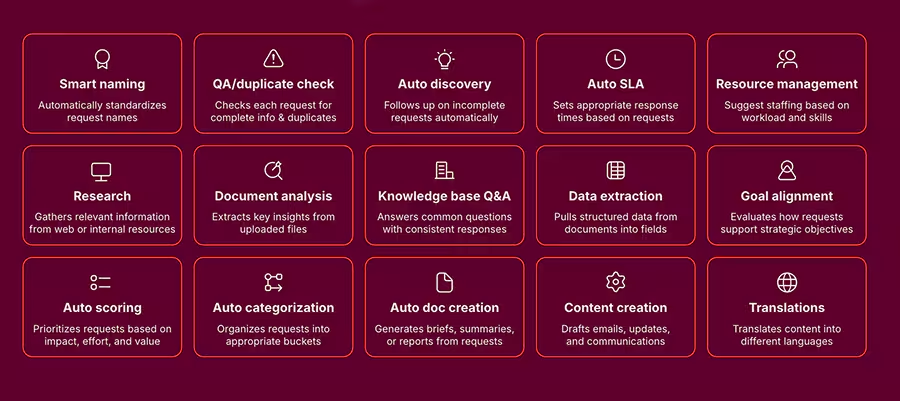
Here’s what I love about Asana’s approach to artificial intelligence: they didn’t just slap a chatbot onto their platform and call it a day. Instead, they spent real time figuring out what project managers actually struggle with every day.
Sofia Dewar, who leads AI user experience research at Asana, put it perfectly when she said they wanted to get these features into customers’ hands quickly, but make sure they were actually valuable and easy to use from day one. They worked directly with real teams to understand what would genuinely help, not just what sounded cool in a press release.
The result? AI features that feel like they were designed by someone who’s actually managed projects before. Every tool solves a real problem that you’ve probably faced yourself.
The Game-Changing Features Everyone’s Talking About
Smart Summaries: Finally, Status Updates That Don’t Suck
Remember when getting caught up on a project meant reading through dozens of comments, task updates, and status changes? Yeah, that’s over.
Smart Summaries give you the complete picture in seconds. Whether you’re jumping into a project mid-stream, coming back from vacation, or preparing for a client meeting, you get exactly what you need to know without the information overload.
But here’s where it gets really good – these summaries work at different levels. Need a quick project update? Done. Want to see how your entire portfolio is performing? The AI pulls together insights from all your projects and gives you that executive-level view that actually makes sense.
I tested this with a client project that had been running for three months. Instead of spending an hour reading through everything, I got a perfect summary in about 10 seconds that highlighted the key decisions, current blockers, and upcoming milestones. Game changer.
AI Studio: Build Your Own AI Assistant (No Coding Required)
This is where Asana really shows off. AI Studio lets you create custom AI workflows that fit exactly how your team works. And get this – you don’t need to know a single line of code.
You literally just tell the AI what you need it to do, and it builds the workflow for you. Want automatic status reports? Done. Need tasks to be assigned based on team capacity? Easy. Want to extract key information from client emails and turn them into actionable tasks? The AI’s got you covered.
I built a workflow that automatically creates project briefs from our initial client discovery calls. What used to take me 45 minutes of note-taking and formatting now happens automatically. The AI pulls out the key requirements, deadlines, and stakeholders, then formats everything into our standard brief template.
The best part? You can start simple and get more sophisticated as you discover new opportunities. My team started with basic automated reports and now has AI handling everything from task routing to performance analysis.
AI Teammates: Your Digital Coworkers Actually Work
Okay, this sounds like science fiction, but stay with me – AI Teammates are basically AI agents that can handle complex work just like a human team member would. These aren’t simple automation rules; they’re sophisticated AI that can make decisions, process information, and handle multi-step processes.
Think about it like this: you know that team member who’s incredibly reliable, never forgets anything, and can work 24/7 without getting tired? That’s what an AI Teammate brings to your projects.
I’ve seen marketing teams use AI Teammates to monitor campaign performance and automatically adjust budgets based on what’s working. Operations teams have them handling routine requests and ensuring everything follows company procedures. Project managers use them to spot potential problems before they become real issues.
One client set up an AI Teammate to monitor their customer success metrics. It tracks satisfaction scores, identifies at-risk accounts, and automatically creates action items for the human team to follow up. Their customer retention improved by 23% in just three months.
Smart Editor: Making Everyone Sound Professional
We’ve all been there – you’re writing a project update and it either sounds too casual or so formal that nobody wants to read it. The Smart Editor fixes this by giving you real-time suggestions that make your writing clearer and more effective.
As you type, it analyzes your content and suggests improvements. Maybe your explanation is unclear, maybe you’re being too wordy, or maybe you need to add more detail. The AI helps you find that sweet spot where your communication is professional but still sounds like you.
This is especially helpful for remote teams where written communication is everything. Everyone’s updates maintain a consistent, professional standard without losing their personal voice.
Smart Goals: Turn Big Ideas Into Achievable Plans
Goal setting is where most teams fall apart. You start with these ambitious visions, but somehow they never translate into actionable plans that actually get done.
Smart Goals fixes this by helping you write better objectives from the start. You describe what you want to achieve in plain language, and the AI helps you refine it into something specific, measurable, and realistic.
For example, if you write “improve customer satisfaction,” the AI might suggest breaking this down into specific metrics like “increase customer satisfaction scores from 4.2 to 4.5 by Q4” and help you identify the key actions needed to get there.
Smart Answers: Just Ask What You Need to Know
This might be my favorite feature. Instead of clicking through multiple screens and running reports to find information, you can just ask questions in plain English.
“What are our biggest blockers right now?” “Who has capacity for new work this week?” “Are we on track for our quarterly goals?”
The AI doesn’t just search for keywords – it understands what you’re really asking and gives you meaningful answers that help you make decisions. It’s like having an incredibly knowledgeable assistant who knows everything about your projects and can answer any question instantly.
How Real Teams Are Using This Stuff
Marketing Teams Are Loving the Automation:
I worked with a marketing agency that was drowning in campaign management. They had multiple clients running different campaigns across various channels, and just keeping track of everything was a full-time job.
Now they use AI Studio to automatically generate performance reports, Smart Summaries to keep clients updated without manual work, and AI Teammates to monitor campaigns and alert the human team when something needs attention.
The result? They increased their client capacity by 40% without adding staff, and their campaign performance improved because they could focus on strategy instead of administrative tasks.
Product Teams Are Shipping Faster:
A software company I know was struggling with stakeholder communication during product development. Executives wanted updates, but developers didn’t want to spend time in meetings explaining technical details.
Smart Summaries solved this completely. Stakeholders get automatic updates about feature progress, timeline changes, and potential blockers. Developers focus on building, executives stay informed, and products ship on schedule.
They also use Smart Goals to ensure their product objectives align with business strategy while remaining technically feasible. No more ambitious goals that turn out to be impossible to deliver.
Customer Success Teams Are Preventing Churn:
Customer success is all about staying ahead of problems, but most teams are reactive because they can’t monitor everything manually.
AI Teammates changed this game completely. They monitor customer health scores, usage patterns, and satisfaction metrics continuously. When something looks concerning, they automatically create tasks for human team members to investigate.
One company reduced customer churn by 31% simply because they could identify and address issues before customers decided to leave.
Getting Started Without Overwhelming Your Team
The biggest mistake I see companies make is trying to implement every AI feature at once. Your team will hate you, nothing will work properly, and you’ll conclude that AI isn’t ready for business use.
Here’s the approach that actually works:
Start Small and Build Confidence : Begin with Smart Summaries and Smart Editor. These provide immediate value without changing how your team works. Everyone can see the benefits right away, and you build familiarity with AI features gradually.
Add Custom Intelligence Once your team is comfortable, introduce AI Studio with simple workflows. Start with something obvious like automated status reports before moving to more complex automations.
Expand to Advanced Features As your team develops AI literacy and sees more opportunities, add AI Teammates and advanced workflows. This phase requires good change management because you’re fundamentally changing how work gets done.
Use AI for Strategic Decisions The final phase is using AI for strategic planning, predictive analytics, and organizational optimization. This requires mature data practices and clear governance, but the payoff is enormous.
What Success Actually Looks Like
When clients ask me how to measure AI success, I focus on three areas:
Time Savings: How much time are you saving on routine tasks? How quickly can you get project information? How much faster are decisions being made?
Quality Improvements: Are projects being delivered more consistently? Are goals being achieved more often? Is communication clearer and more effective?
Strategic Impact: Can you respond to changes faster? Are you making better decisions? Is your team focusing on high-value work instead of administrative tasks?
One client tracked these metrics and found that AI features saved each project manager about 8 hours per week, improved project delivery rates by 22%, and increased team satisfaction scores significantly.
The Future Is Already Here
What excites me most about Asana’s AI approach is that this is just the beginning. They’re continuously improving based on user feedback and real-world usage. The features we have today will seem basic compared to what’s coming.
But here’s the key insight: this isn’t about replacing human creativity and strategic thinking. It’s about amplifying what humans are already great at by handling the routine work that bogs us down.
The teams that embrace this now will have a massive competitive advantage as AI becomes standard across all business tools. They’ll be more efficient, more strategic, and more effective at delivering results.
Why This Matters More Than You Think
Project management has always been about coordination, communication, and keeping things on track. But as businesses move faster and become more complex, traditional approaches just can’t keep up.
AI-powered project management isn’t a nice-to-have anymore – it’s becoming essential for teams that want to thrive instead of just survive. The question isn’t whether AI will transform how we work; it’s whether your organization will be ready to take advantage of that transformation.
Asana AI gives you practical, immediately useful tools that solve real problems without requiring a computer science degree to use. Whether you’re managing a small team or coordinating complex enterprise initiatives, these features can help you work smarter, move faster, and achieve better results.
The best part? You can start using these features today. No waiting for future releases, no complex implementations, no massive training programs. Just practical AI tools that make project management feel like what it should have been all along – intelligent, efficient, and focused on getting great work done.
Ready to see what AI-powered project management can do for your team? The future of work is here, and it’s more accessible than you might think.