
I Built 5 Apps in a Week Using Lovable.dev – Here’s What Happened
Remember when building a web app meant spending weeks learning to code, setting up development environments, and debugging endless errors? Yeah, those days are basically over now.
I just spent the last month testing Lovable.dev, an AI-powered platform that lets you build full-stack web applications just by describing what you want in plain English. And honestly? It’s kind of mind-blowing.
I’m not going to pretend it’s perfect – because it’s not. But after building everything from a personal task manager to a customer feedback portal, I’ve learned exactly what this tool can do, where it struggles, and whether it’s worth your time and money.
What Actually Is Lovable.dev?
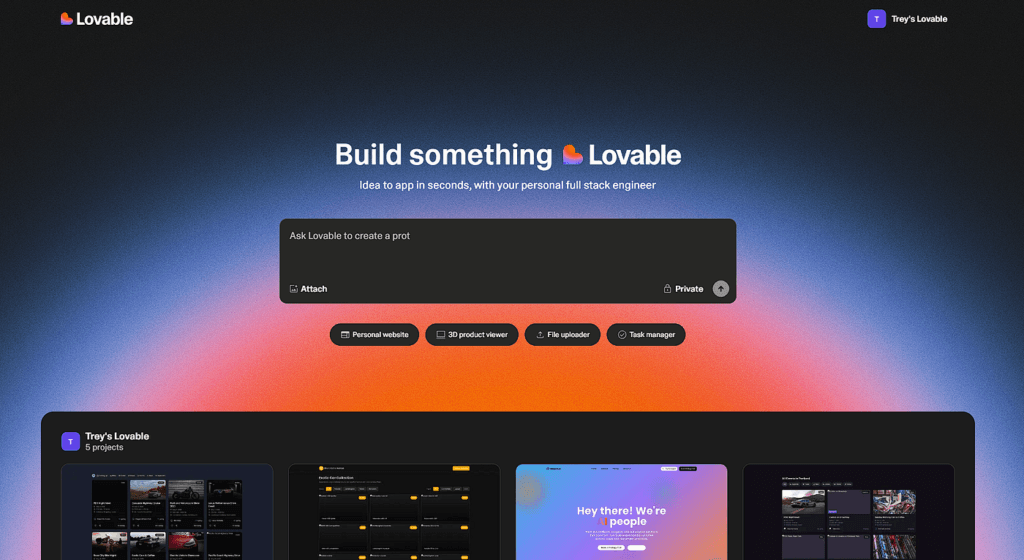
Here’s the simplest explanation: Lovable.dev is a full-stack AI application development platform that generates real, editable source code from natural-language prompts. You literally just chat with an AI and it builds your app.
But here’s what makes it different from other no-code tools – Lovable focuses on producing production-ready codebases, not visual blocks. You get actual React code that you can export, edit, and deploy wherever you want. You’re not locked into some proprietary system.
Think of it like having a superhuman developer sitting next to you who can instantly build whatever you describe. You want a login page? Done in 30 seconds. Need a dashboard with charts? Two minutes. Want to connect to a database? Just ask.
The platform started as an open-source tool called GPT Engineer before evolving into the commercial platform we have today. The founders transitioned GPT Engineer into Lovable.dev with the clear mission: democratize software development through intelligent automation and intuitive design.
And the results speak for themselves – the platform hit £13.50 million ARR just three months after its launch. That’s insane growth for any SaaS product.
How It Actually Works (No BS Explanation)
Using Lovable is refreshingly straightforward. Here’s the real workflow:
Step 1: Describe Your Idea
You start by telling Lovable what you want to build. I tested this with everything from vague ideas like “build me a task manager” to super specific requests like “create a feedback portal with upvoting, comments, and admin moderation.”
The cool part? You don’t need technical jargon. Just explain it like you’re talking to a friend who happens to be really good at coding.
Step 2: Watch It Build
The AI engine pulls from a massive database of code snippets, templates, and design best practices to create a prototype that aligns with your description. You see a live preview on the right side of your screen as it generates the code.
This takes anywhere from 30 seconds for simple pages to a few minutes for complex features. Way faster than traditional development.
Step 3: Iterate and Refine
Here’s where it gets really good. After the first version is generated, you can provide feedback directly in the interface. Want a bigger button? Different colors? Extra functionality? Just type it in conversational language and Lovable makes the changes.
It’s like pair programming with an AI that never gets tired or frustrated.
Step 4: Deploy
When you’re happy with what you’ve built, you can deploy with literally one click. Lovable handles all the hosting complexity, or you can export the code and deploy it yourself on platforms like Vercel or Netlify.
The Lovable 2.0 Game-Changer
In mid-2025, Lovable dropped version 2.0, and it completely changed the game. Let me walk you through the features that actually matter:
Chat Mode Agent: Your AI Development Partner
The chat mode agent’s intelligence has increased tenfold, supporting multi-step reasoning, file searching, log checking, and database queries. This is huge.
Here’s how it works in practice: instead of having the AI immediately start editing your code when you ask a question, Chat Mode helps you think through problems first.
I was building a user authentication system and wasn’t sure about the best approach. I switched to Chat Mode and asked “What’s the best way to implement password reset functionality?” The agent walked me through different approaches, explained the security implications, and helped me plan the implementation before writing any code.
Unlike previous versions, this agent doesn’t make direct code edits. Instead, it reasons across multiple steps, searching files, inspecting logs, and querying databases to provide strategic guidance.
When you’re ready to implement, you just say “implement the plan” and it switches to Edit Mode to actually write the code.
Multiplayer Workspaces: Real Collaboration
This feature alone justifies the upgrade. You can now collaborate with up to 20 users at once depending on your plan.
I tested this with my team and it’s genuinely impressive. You see everyone’s cursors moving in real-time, just like Google Docs. Changes sync instantly. The AI responds to multiple team members simultaneously.
For startups building MVPs or agencies working with clients, this is massive. Your non-technical founder can describe features while your developer refines the implementation, all in the same workspace.
Security Scanning: Because AI Code Can Be Sketchy
Let’s be real – one concern with AI-generated code is security. Lovable 2.0 integrates Supabase Edge Function log analysis to automatically detect risks such as SQL injection and authentication vulnerabilities.
Every time you’re about to deploy, Lovable scans your code for common security issues. It’s not perfect, but it catches a lot of the obvious stuff that could get you in trouble.
Dev Mode: For When You Want Control
Sometimes you need to get your hands dirty with actual code. Dev Mode allows paid users to directly edit project code within Lovable.
I use this when the AI doesn’t quite nail a specific implementation. I can jump into Dev Mode, make the precise changes I want, then jump back to conversational mode for other features.
What Can You Actually Build?
I tested Lovable with a bunch of different project types. Here’s what worked well and what didn’t:
Absolutely Nailed It:
- Landing pages and marketing sites – These turned out beautiful every single time
- Internal tools and dashboards – Perfect for team productivity apps
- Simple SaaS prototypes – Great for validating ideas before committing resources
- CRUD applications – Task managers, contact lists, simple CRMs all work flawlessly
- Admin panels – User management, content moderation, data visualization
Struggled With:
- Complex business logic – Multi-step workflows with intricate rules get messy
- Advanced animations – Basic stuff works, but complex motion design is tough
- Real-time features – While possible, getting WebSocket connections right took multiple iterations
- Mobile apps – Lovable is web-only, no native mobile development
The Sweet Spot:
Lovable AI shines when you need to ship something fast – think MVPs, prototypes, internal tools, and proof-of-concepts. If you’re trying to build the next Facebook, this probably isn’t your tool. But for 80% of business applications? It’s perfect.
The Real Deal: Pros and Cons
Let me be completely honest about what’s good and what sucks.
What Actually Works Well:
Speed is Ridiculous I built a functional feedback portal in about 3 hours that would’ve taken me a week to code manually. Lovable delivers on its promise of turning ideas into working apps in minutes. For rapid prototyping, nothing else comes close.
The UI is Beautiful by Default Every generated interface uses Tailwind CSS with modern design principles. You don’t need design skills to create something that looks professional. My apps looked better than stuff I’d spent days designing manually.
You Own the Code Unlike some no-code platforms, Lovable generates actual React code you can export and customize. GitHub integration allows version control and collaboration with developers. This is huge – you’re never locked in.
Supabase Integration is Seamless Setting up authentication, databases, and storage through Supabase takes like 5 minutes. Lovable integrates with Supabase to provide backend features for hosting, auth, and storage. No backend coding required.
Where It Falls Short:
Credit System is Frustrating The monthly and daily credit limits can be frustrating. Complex features consume credits rapidly, and users often hit limits mid-project without clear warnings about usage.
I burned through my daily credits in like 2 hours when I was iterating on a complex feature. Having to wait until tomorrow to continue working? That sucks.
AI Sometimes Misunderstands The AI sometimes misinterprets styling requests, requiring multiple iterations. I asked for a “minimal, clean design” and got something that looked like a 2010 website. It took three more attempts to get it right.
Debugging Can Be a Loop When something breaks, sometimes Lovable gets stuck trying to fix it. You’ll spend a lot of time wrestling with that last 30% to make it usable for real customers. The “Try to Fix” button helps, but it’s not magic.
Code Quality Varies Generated code sometimes includes redundant components or non-optimal patterns. Experienced developers may need to refactor for production scalability.
For prototypes? Fine. For production apps handling serious traffic? You’ll want a real developer to review and optimize.
Real User Experiences (The Good and the Ugly)
I spent hours reading through Reddit posts, user reviews, and testing feedback. Here’s what actual users are saying:
The Speed Factor: Many users agree that Lovable helps them move faster than any other builder. One developer claimed they built 30 different applications in 30 days – something impossible with traditional coding.
The Credit Complaints: This is the number one issue people complain about. Multiple Reddit users mentioned burning through credits way faster than expected, especially when debugging or making iterative changes.
The “Good Enough” Problem: Most agree that Lovable is incredibly fast at building web apps, but many mention getting stuck in repetitive error loops. Several users described Lovable as getting you “70% of the way there” with that final 30% being frustratingly difficult.
The Enterprise Concerns: For projects with sensitive data or complex requirements, users recommend more established tools. Security and data handling still feel immature for mission-critical applications.
Pricing: Is It Worth It?
Let’s talk money because this is where things get interesting.
Free Plan: $0/month
- 5 credits per day (capped at 30/month)
- Good for testing and small experiments
- Honestly not enough for real development
Pro Plan: $25/month
- 100 monthly credits
- 5 daily credits
- Code Mode access
- Custom domains
- 2 collaborators
Business/Teams Plan: $50-900/month
- More credits based on usage
- Up to 20 collaborators
- Priority support
- SSO and privacy controls
Here’s my take: Workspace collaboration is now included on Free and Pro plans (up to 20 members), no extra cost to invite teammates. That’s actually a solid deal for small teams.
But the credit system? It’s unpredictable. Simple changes might cost 1 credit. Complex features could eat 10+ credits. You never quite know how much something will cost until you try it.
For comparison, paying a developer $50-100/hour would quickly exceed even the higher-tier plans. But unlike a developer, Lovable can’t handle truly complex requirements.
Who Should Actually Use This?
After extensive testing, here’s who benefits most:
Perfect For:
- Solo founders validating ideas – Build an MVP in days instead of months
- Non-technical entrepreneurs – Turn your vision into reality without hiring developers
- Agencies doing rapid prototyping – Show clients working demos before committing to full development
- Backend developers – Skip the frontend tedium and focus on what you’re good at
- Internal tool builders – Create dashboards, admin panels, and workflow tools quickly
Not Great For:
- Complete beginners – You need at least basic understanding of how web apps work
- Enterprise applications – Security and scalability concerns remain
- Complex custom requirements – Highly specialized functionality requires traditional development
- Mobile app development – Web-only platform, no native mobile support
Lovable vs The Competition
How does Lovable stack up against alternatives?
Lovable vs Bolt.new: Bolt is faster for simple landing pages but lacks backend capabilities. Lovable provides full-stack development with database integration.
Lovable vs Cursor: Cursor is an AI-powered code editor for developers. Lovable is more accessible for non-technical users but gives developers less control.
Lovable vs V0 by Vercel: V0 excels at generating beautiful UI components but doesn’t handle backend logic. Lovable builds complete applications.
Lovable vs Replit Agent: Replit supports more programming languages and environments. Lovable focuses specifically on React web apps but does them better.
The real differentiator? Lovable’s ability to export a real codebase is why it’s popular among developers who want to skip boilerplate setup but avoid being trapped in a no-code ecosystem.
Tips for Actually Getting Good Results
After building multiple apps, here’s what I learned:
Start Small and Build Up Don’t try to describe your entire app in one prompt. Start with the core feature, get that working, then add complexity. Tackling smaller tasks allows for better testing and reduces complexity.
Be Specific About Design Use descriptive terms like “minimal,” “elegant,” or “tech-inspired” rather than vague requests. “Make it look better” doesn’t work. “Use a clean, modern design with lots of white space and subtle shadows” does.
Use Chat Mode for Planning Before implementing complex features, switch to Chat Mode and talk through the approach. This saves tons of credits and prevents the AI from going off in the wrong direction.
Test Frequently Use Lovable’s preview links to test changes frequently. Don’t wait until you’ve made 20 changes to test – you’ll have no idea what broke what.
Leverage Supabase Features The Supabase integration is powerful. Use Supabase Storage for file uploads and implement real-time features for live updates. Don’t try to build these from scratch.
The Bottom Line: Should You Use Lovable.dev?
After a month of intensive testing, here’s my honest verdict:
Lovable.dev is legitimately impressive for rapid prototyping and MVP development. The speed advantage is real – I built projects in hours that would’ve taken weeks traditionally. The code quality is good enough for early-stage products, and the export capability means you’re never locked in.
But it’s not magic. You’ll still hit frustrating limitations, burn through credits faster than expected, and occasionally want to tear your hair out when the AI misunderstands what you want.
Use Lovable if:
- You need to validate an idea quickly
- You’re building internal tools or simple web apps
- You want to prototype before investing in full development
- You have basic technical understanding but don’t want to code everything from scratch
Skip Lovable if:
- You’re building mission-critical applications with sensitive data
- You need highly customized, complex functionality
- You have no technical background whatsoever
- You’re planning a mobile-first product
The future of software development probably looks a lot like Lovable – natural language interfaces powered by AI that handle the grunt work while humans focus on strategy and creativity. We’re not quite there yet, but we’re getting close.
For now, Lovable occupies a sweet spot for founders, small teams, and anyone who needs to move fast without a massive development budget. It’s not going to replace professional developers, but it might reduce how many you need to hire.
Is it perfect? No. Is it useful? Absolutely. Will it save you time and money on the right projects? Definitely.
Just make sure you understand its limitations before committing to building your next unicorn startup on it. Start with a small project, see how it works for you, and scale up from there.
The free plan gives you enough credits to test it properly. My advice? Try building something simple first. If Lovable handles that well, you’ll know whether it’s right for your bigger projects.
Welcome to the future of app development – it’s messy, it’s imperfect, but damn, it’s fast.